Introduction to Containers
Before asking ourselves what a container is, we should answer another question: what is a process?
- A process is an instance of an executing program.
- A program is a file holding information necessary to execute the process.
- A program can be dynamically linked to external libraries, or it can be statically linked in the program itself (the Go programming language uses this approach by default).
- A process is executed in the machine CPU and allocates a portion of memory containing program code and variables used by the code itself.
- The process is instantiated in the machine's user space, and its execution is orchestrated by the operating system kernel.
- When a process is executed, it needs to access different machine resources such as I/O (disk, network, terminals, and so on) or memory.
- When the process needs to access those resources, it performs a system call into the kernel space (for example, to read a disk block or send packets via the network interface).
- The process indirectly interacts with the host disks using a filesystem, a multi-layer storage abstraction, that facilitates the write and read access to files and directories.
- They are orchestrated by the OS kernel with complex scheduling logic that makes the processes behave like they are running on a dedicated CPU core, while it is shared among many of them.
- The same program can instantiate many processes of its kind (for example, multiple web server instances running on the same machine).
- Conflicts, such as many processes trying to access the same network port, must be managed accordingly.
- Nothing prevents us from running a different version of the same program on the host, assuming that system administrators will have the burden of managing potential conflicts of binaries, libraries, and their dependencies. This could become a complex task, which is not always easy to solve with common practices.
Containers
- Simple and smart answer to the need to run isolated process instances.
- Form of application isolation that works on many levels:
- File system isolation: Containerized processes have a separate filesystem view, and their programs are executed from the isolated filesystem itself.
- Process ID isolation: This is a containerized process run under an independent set of process IDs (PIDs).
- User isolation: User IDs (UIDs) and group IDs (GIDs) are isolated to the container. A process user and group ID can be different inside a container and run with a privileged UID or GID inside the container only.
- Network isolation: This kind of isolation relates to the host network resources, such as network devices, IPv4 and IPv6 stacks, routing tables, and firewall rules.
- IPC isolation: Containers provide isolation for host IPC resources, such as POSIX message queues or System V IPC objects.
- Resource usage isolation: Containers rely on Linux control groups (cgroups) to limit or monitor the usage of certain resources, such as CPU, memory, or disk. We will discuss more about cgroups later in this chapter.

-
Applications running natively on a system that does not provide containerization features share the same binaries and libraries, as well as the same kernel, filesystem, network, and users.
-
This could lead to many issues when an updated version of an application is deployed, especially conflicting library issues or unsatisfied dependencies.
-
Containers offer a consistent layer of isolation for applications and their related dependencies that ensures seamless coexistence on the same host. A new deployment only consists of the execution of the new containerized version, as it will not interact with or conflict with the other containers or native applications.
-
Linux containers are enabled by different native kernel features, with the most important being Linux namespaces.
-
Namespaces abstract specific system resources (notably, the ones described before, such as network, filesystem mount, users, and so on) and make them appear as unique to the isolated process.
-
In this way, the process has the illusion of interacting with the host resource – for example, the host filesystem – while an alternative and isolated version is being exposed.
Currently, we have a total of eight kinds of namespaces:
- Mount namespaces: These provide isolation of the mount point list that is seen by the processes in the namespace.
- PID namespaces: These isolate the process ID number in a separate space, allowing processes in different PID namespaces to retain the same PID.
- User namespaces: These isolate UIDs and GIDs, the root directory, keyrings, and capabilities. This allows a process to have a privileged UID and GID inside the container while simultaneously having unprivileged ones outside the namespace.
- UTS namespaces: These allow the isolation of the hostname and NIS domain name.
- Network namespaces: These allow the isolation of networking system resources, such as network devices, IPv4 and IPv6 protocol stacks, routing tables, firewall rules, port numbers, and so on. Users can create virtual network devices called veth pairs to build tunnels between network namespaces.
- IPC namespaces: These isolate IPC resources such as System V IPC objects and POSIX message queues. Objects created in an IPC namespace can be accessed only by the processes that are members of the namespace. Processes use IPC to exchange data, events, and messages in a client-server mechanism.
- cgroup namespaces: These isolate cgroup directories, providing a virtualized view of the process's cgroups.
- Time namespaces: These provide an isolated view of system time, letting processes in the namespace run with a time offset against the host time.
Resource usage with cgroups
-
cgroups are a native feature of the Linux kernel whose purpose is to organize processes in a hierarchical tree and limit or monitor their resource usage.
-
The kernel cgroups interface, similar to what happens with
proc, is exposed with acgroupfspseudo-filesystem. -
This filesystem is usually mounted under
/sysfscgroupin the host. -
cgroups offer a series of controllers (also called subsystems) that can be used for different purposes, such as limiting the CPU time share of a process, memory usage, freezing and resuming processes, and so on.
-
The organizational hierarchy of controllers has changed through time, and there are currently two versions, v1 and v2. In cgroups v1, different controllers can be mounted against different hierarchies.
-
Instead, cgroups v2 provides a unified hierarchy of controllers, with processes residing in the leaf nodes of the tree.
-
Currently, cgroups v1 is going to be deprecated in favor of v2, but some distributions still support it for backwards compatibility.
-
cgroups are used by containers to limit CPU or memory usage.
-
For example, users can limit the CPU quota, which means limiting the number of microseconds the container can use the CPU over a given period, or limit CPU shares, the weighted proportion of CPU cycles for each container.
Running isolated processes
- GNU/Linux operating systems offer all the features necessary to run a container manually.
- This result can be achieved by working with a specific system call (notably
unshare()andclone()) and utilities such as theunsharecommand.
To run a process, let’s say /binsh, in an isolated PID namespace, users can rely on the unshare command:
The result is the execution of a new shell process in an isolated PID namespace. Users can try to monitor the process view and will get an output such as the following:
-
The shell process of the preceding example is running with
PID 1, which is correct, since it is the very first process running in the new isolated namespace. -
The PID namespace will be the only one to be abstracted, while all the other system resources still remain the original host ones.
-
If we want to add more isolation, for example, on a network stack, we can add the
--netflag to the previous command:
# unshare --fork --net --pid --mount-proc /bin/sh
- Inspect the network IP configuration and realize that the host native devices are no longer directly seen by the unshared process:
- Containers are strongly related to Linux native features.
- The OS provided a solid and complete interface that helped container runtime development, and the capability to isolate namespaces and resources was the key that unlocked container adoption.
- The role of the container runtime is to abstract the complexity of the underlying isolation mechanisms, with mount point isolation being probably the most crucial of them.
Isolating mounts
- To gain the filesystem isolation that prevents binary and library conflicts, users need to create another layer of abstraction for the exposed mount points.
mount namespaces and bind mounts.
-
First introduced in 2002 with the Linux kernel 2.4.19
-
Mount namespaces isolate the list of mount points seen by the process.
-
Each mount namespace exposes a discrete list of mount points, thus making processes in different namespaces aware of different directory hierarchies.
-
It is possible to expose to the executing process an alternative directory tree that contains all the necessary binaries and libraries of choice.
-
Users should handle different archive versions of directory trees from different distributions, extract them, and bind mount them on separate namespaces.
-
The first approaches with containers in Linux followed this approach.
-
Container images
- An innovative, multi-layered, copy-on-write approach of managing the directory trees that introduced a simple and fast method of copying, deploying, and using the tree necessary to run the container.
Container images to the rescue
- Docker introduced this smart method of storing data for containers.
- Later, images would become an Open Container Initiative (OCI) standard specification (https://github.com/opencontainers/image-spec).
Images
-
Can be seen as a filesystem bundle that is downloaded (pulled) and unpacked in the host before running the container for the first time.
-
Are downloaded from repositories called image registries.
-
Those repositories can be seen as specialized object storage that holds image data and related metadata.
-
There are both public and free-to-use registries (such as
quay.ioordocker.io) and private registries that can be executed in the customer's private infrastructure, on-premises, or in the cloud. -
Images can be built by DevOps teams to fulfill special needs or embed artifacts that must be deployed and executed on a host.
-
During the image build process, developers can inject pre-built artifacts or source code that can be compiled in the build container itself.
-
To optimize image size, it is possible to create multi-stage builds with a first stage that compiles the source code using a base image with the necessary compilers and runtimes, and a second stage where the built artifacts are injected into a minimal, lightweight image, optimized for fast startup and minimal storage footprint.
-
The recipe of the build process is defined in a special text file called a Dockerfile, which defines all the necessary steps to assemble the final image.
-
After building them, users can push their own images to public or private registries for later use or complex, orchestrated deployments.
Build workflow:

-
Can be considered as a packaging technology.
-
When users build their own image with all the binaries and dependencies installed in the OS directory tree, they are effectively creating a self-consistent object that can be deployed everywhere with no further software dependencies.
-
From this point of view, container images are an answer to the long-standing phrase, It works on my machine.
-
Can be certain of the execution environment of your applications
-
They simplify the deployment process by removing the tedious task of maintaining and updating a server’s library dependencies.
copy-on-write multi-layered approach
- Instead of having a single bulk binary archive, an image is made up of many
tararchives called blobs or layers. - Layers are composed together using image metadata and squashed into a single filesystem view.
- This result can be achieved in many ways, but the most common approach today is by using union filesystems.
OverlayFS (https://www.kernel.org/doc/html/latest/filesystems/overlayfs.html)
- The most used union filesystem nowadays.
- Maintained in the kernel tree, despite not being completely POSIX-compliant.
- An overlay filesystem combines two filesystems – an ‘upper’ filesystem and a ’lower’ filesystem."
- This means that it can combine more directory trees and provide a unique, squashed view.
- The directories are the layers and are referred to as
lowerdirandupperdirto respectively define the low-level directory and the one stacked on top of it. - The unified view is called merged.
- Supports up to 128 layers.
- Not aware of the concept of container images; it is merely used as a foundation technology to implement the multi-layered solution used by OCI images.
immutability.
-
Implemented by OCI Images
-
The layers of an image are all read-only and cannot be modified. The only way to change something in the lower layers is to rebuild the image with appropriate changes.
-
An important pillar of the cloud computing approach.
-
An infrastructure (such as an instance, container, or even complex clusters) can only be replaced by a different version and not modified to achieve the target deployment.
-
We usually do not change anything inside a running container (for example, installing packages or updating config files manually), even though it could be possible in some contexts.
-
Rather, we replace its base image with a new updated version. This also ensures that every copy of the running containers stays in sync with the others.
-
When a container is executed, a new read/write thin layer is created on top of the image.
-
This layer is ephemeral, so any changes on top of it will be lost after the container is destroyed:

-
We do not store anything inside containers.
-
Their only purpose is to offer a working and consistent runtime environment for our applications.
-
Data must be accessed externally, by using bind mounts inside the container itself or network storage (such as Network File System (NFS), Simple Storage Service (S3), Internet Small Computer System Interface (iSCSI), and so on).
-
Containers' mount isolation and layered images design provide a consistent immutable infrastructure, but more security restrictions are necessary to prevent processes with malicious behaviors from escaping the container sandbox to steal sensitive host information or use the host to attack other machines.
Security considerations
-
If a process is running inside a container, it simply does not mean it is more secure than others.
-
A malicious attacker could still make its way through the host filesystem and memory resources.
-
To achieve better security isolation, additional features are available:
- Mandatory access control:
- Security Enhanced Linux (SELinux) or AppArmor can be used to enforce container isolation against the parent host.
- These subsystems, and their related command-line utilities, use a policy-based approach to better isolate the running processes in terms of filesystem and network access.
- Capabilities:
- When an unprivileged process is executed in the system (which means a process with an effective UID different from
0), it is subject to permission checking based on the process's credentials (its effective UID). - Those permissions, or privileges, are called capabilities and can be enabled independently, assigning to an unprivileged process a restricted set of privileged permissions to access specific resources.
- When running a container, we can add or drop capabilities.
- When an unprivileged process is executed in the system (which means a process with an effective UID different from
- Secure computing mode (Seccomp):
- This is a native kernel feature that can be used to restrict the syscall that a process is able to make from user space to kernel space.
- By identifying the strictly necessary privileges needed by a process to run, administrators can apply seccomp profiles to limit the attack surface.
- Mandatory access control:
-
Applying the preceding security features manually is not always easy and immediate, as some of them require a shallow learning curve.
-
Instruments that automate and simplify (possibly in a declarative way) these security constraints provide high value.
Container engines and runtimes
-
Running and securing containers manually is an unreliable and complex approach.
-
It is too hard to reproduce and automate in production environments, and can easily lead to configuration drift among different hosts.
-
This is the reason container engines and runtimes were born – to help automate the creation of a container and all the related tasks necessary that culminate in a running container.
container engine
- A software tool that accepts and processes requests from users to create a container with all the necessary arguments and parameters.
- Can be seen as a sort of orchestrator, since it takes care of putting in place all the necessary actions to have the container up and running; yet it is not the effective executor of the container (the container runtime's role).
- Usually solve the following problems:
- Providing a command line and/or REST interface for user interaction
- Pulling and extracting container images
- Managing the container mount point and bind-mounting the extracted image
- Handling container metadata
- Interacting with the container runtime
- A thin R/W layer is created on top of the image; this task is achieved by the container engine, which takes care of presenting a working stack of the merged directories to the container runtime.
Wide choice of container engines:
- Docker (most well-known (despite not being the first) engine implementation)
- Podman
- CRI-O
- containerd
- LXD.
container runtime
-
A lower-level piece of software used by container engines to run containers on the host.
-
Provides the following functionalities:
- Starting the containerized process at the target mount point (usually provided by the container engine) with a set of custom metadata
- Managing the cgroups' resource allocation
- Managing mandatory access control policies (SELinux and AppArmor) and capabilities
-
Most of them implement the OCI runtime spec reference (https://github.com/opencontainers/runtime-spec).
-
An industry standard that defines how a runtime should behave and the interface it should implement.
-
The most common OCI runtime is runc, used by most notable engines, along with other implementations such as crun, kata-containers, youki, and gVisor.
-
This modular approach lets container engines swap the container runtime as needed.
-
When Fedora 33 came out, it introduced a new default cgroups hierarchy called cgroups v2.
-
runc did not initially support cgroups v2, and Podman simply swapped runc with another OCI-compatible container runtime (crun) that was already compliant with the new hierarchy.
-
3Now that runc finally supports cgroups v2, Podman will be able to safely use it again with no impact for the end user.
Containers versus virtual machines
- Containers are not virtual machines.
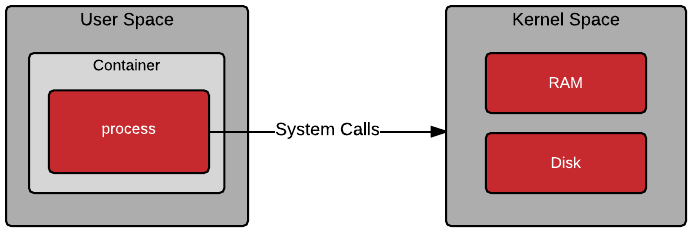
- A Container, despite being isolated, holds a process that directly interacts with the host kernel using System Calls.
- The process may not be aware of the host namespaces, but it still needs to context-switch into Kernel Space to perform operations such as I/O access.
- A virtual machine is always executed on top of a hypervisor, running a guest operating system with its own filesystem, networking, storage (usually as image files), and kernel.
- The hypervisor is software that provides a layer of hardware abstraction and virtualization to the guest OS, enabling a single bare-metal machine running on capable hardware to instantiate many virtual machines.
- The hardware seen by the guest OS kernel is mostly virtualized hardware, with some exceptions:

-
When a process performs a system call inside a virtual machine, it is always directed to the guest OS kernel.
-
Containers share the same kernel with the host, while virtual machines have their own guest OS kernel.
-
From a security point of view, virtual machines provide better isolation from potential attacks.
-
Some of the latest CPU-based attacks (Spectre or Meltdown, most notably) could exploit CPU vulnerabilities to access VMs' address spaces.
-
Containers have refined isolation features and can be configured with strict security policies (such as CIS Docker, NIST, HIPAA, and so on) that make them quite hard to exploit.
-
Containers are faster to spin up than VMs.
-
Milliseconds if the image is already available in the host.
-
Achieved by the kernel-less nature of the container.
-
Virtual machines must boot a kernel and
initramfs, pivot into the root filesystem, run some kind of init (such assystemd), and start a variable number of services. -
A VM will usually consume more resources than a container.
-
To spin up a guest OS, we usually need to allocate more RAM, CPU, and storage than the resources needed to start a container.
-
The best practice for containers is to spin up a container for every specific workload.
-
A VM can run different workloads together.
Virtual machines in containers
KubeVirt
- Put virtual machines inside containers.
- Companies with older software that runs best on VMs can now seamlessly integrate it with newer container-based applications, all on the same platform.
- Containers provide an extra layer of security, isolating VMs from each other and from the rest of the servers.
- Kubernetes can now also manage VMs.
QEMU (Quick EMUlator) and KVM (Kernel-based Virtual Machine)
-
QEMU is a versatile tool that emulates various server hardware, tricking a VM into thinking it's running on its own dedicated machine, even though it's really in a container.
-
KVM, a kernel module, enhances QEMU's performance by allowing VMs to access the server's hardware directly.
-
Putting virtual machines in containers empowers companies to combine the best of both worlds, improving security, efficiency, and the overall management of their software infrastructure.
Bootable containers
-
Powered by the open source project bootc
-
Significant evolution beyond traditional containers.
-
Instead of just encapsulating applications, bootable containers are designed to encapsulate an entire operating system, effectively blurring the lines between containers, virtual machines, and physical systems.
-
Specialized container image that can be directly booted on a system, in the same way you would boot a traditional operating system.
-
Achieved by packaging a complete operating system environment, including the kernel, essential libraries, and system tools, within the container image itself.
-
Compliant with the latest standard of the Open Container Initiative (OCI).
-
Offer far greater isolation and control.
-
Secure and self-contained environment for running applications, minimizing the risk of conflicts and interference.
-
Compelling alternative to traditional virtual machines.
-
By eliminating the need for a hypervisor and guest OS, they significantly reduce the resource overhead, resulting in faster boot times, lower memory consumption, and improved overall performance.
-
Ideal for scenarios where a lightweight, portable, and efficient operating system environment is desired, such as embedded systems, edge computing, or specialized servers for machine learning and artificial intelligence applications.
-
Podman Desktop has a bootable containers extension that streamlines the building and management of these unique containers, providing an intuitive interface for experimentation and deployment.
Why do I need a container?
Open source
- The technologies that power container technology are open source and have become open standards widely adopted by many vendors or communities.
- Often associated with high-value and innovative solutions.
- Community-driven projects usually have a great evolutionary boost that helps mature the code and bring new features continuously.
- Available to the public and can be inspected and analyzed. This is a great transparency feature that also has an impact on software reliability, both in terms of robustness and security.
- Promotes an evolutionary paradigm where only the best software is adopted, contributed, and supported.
Portability
- Container image can be pulled and executed on any host that has a container engine running, regardless of the OS distribution underneath.
- A CentOS or nginx image can be pulled indifferently from a Fedora or Debian Linux distribution running a container engine and executed with the same configuration.
- If we have a fleet of many identical hosts, we can choose to schedule the application instance on one of them (for example, using load metrics to choose the best fit) with the awareness of having the same result when running the container.
- Reduces vendor lock-ins and provides better interoperability between platforms.
DevOps facilitators
- Help solve the old "It works on my machine" pattern between development and operations teams when it comes to deploying applications for production.
- Meet the developers' need to create self-consistent bundles with all the necessary binaries and configurations to run their workloads seamlessly.
- Appreciated by operations teams, who are no longer forced to maintain complex dependency constraints or segregate every single application inside VMs.
- Facilitators of DevOps best practices, where developers and operators work closer to deploy and manage applications without rigid separations.
- Developers who want to build their own container images are expected to be more aware of the OS layer built into the image and work closely with operations teams to define build templates and automations.
Cloud readiness
- Containers are built for the cloud, designed with an immutable approach in mind.
- The immutability pattern clearly states that changes in the infrastructure (be it a single container or a complex cluster) must be applied by redeploying a modified version and not by patching the current one.
- Helps to increase a system's predictability and reliability.
- When a new application version must be rolled out, it is built into a new image, and a new container is deployed in place of the previous version.
- Build pipelines can be implemented to manage complex workflows, from application build and image creation, image registry push and tagging, until deployment in the target host.
- This approach drastically shortens the provisioning time while reducing inconsistencies.
Infrastructure optimization
- Containers have a lightweight footprint that drives much greater efficiency in the consumption of compute and memory resources.
- By providing a way to simplify workload execution, container adoption brings great cost savings.
- If an application server that was running on top of a virtual machine can be containerized and executed on a host along with other containers (with dedicated resource limits and requests), computing resources can be saved and reused.
- Whole infrastructures can be re-modulated with this new paradigm in mind; a bare-metal machine previously configured as a hypervisor can be reallocated as a worker node of a container orchestration system that simply runs more granular containerized applications as containers.
Microservices
- Microservice architectures split applications into multiple services that perform fine-grained functions and are part of the application as a whole.
- Traditional applications have a monolithic approach where all the functions are part of the same instance.
- Break the monolith into smaller parts that interact independently.
- Monolithic applications fit well into containers, but microservice applications have an ideal match with them.
Having one container for every single microservice helps:
-
Independent scalability of microservices.
-
More defined responsibilities for development teams' cloud access programs.
-
Potential adoption of different technology stacks over the different microservices.
-
More control over security aspects (such as public-facing exposed services, mTLS connections, and so on).
-
Orchestrating microservices can be a daunting task when dealing with large and articulated architectures.
-
The adoption of orchestration platforms such as Kubernetes, service mesh solutions such as Istio or Linkerd, and tracing tools such as Jaeger and Kiali becomes crucial to achieving control over complexity.
AI/ML
-
Containers are also a valuable tool to develop, train, and serve machine learning/deep learning models or large language models (LLMs).
-
Data scientists and engineers can use containers to isolate their Jupyter notebooks (a de facto standard tool to implement solutions based on AI/ML models) and run them in separate, custom environments.
-
Training is a very important part of model development. Developing a model from scratch can be a very long and expensive task, especially for LLMs: for this reason, many users choose generic foundation models and apply fine-tuning techniques by feeding the model more specialized datasets. The fine-tuning process can be executed inside containers – for example, in a training pipeline that releases a new specialized model starting from the foundation one.
-
After the model has been developed and trained, MLOps engineers can run the model by exposing inference APIs that, again, can be executed inside dedicated containers, thus providing a better layer of encapsulation of the workload and an optimal management of resources.
Where do containers come from?
Chroot and Unix v7
chroot system call.
- A system call (or syscall) is a method used by an application to request something from the OS's kernel.
- Allows the application to change the root directory of the running copy of itself and its children, removing any capability of the running software to escape that jail.
- Allows you to prohibit the running application's access to any kind of files or directories outside the given subtree, which was really a game changer for that time.
- Not built with security in mind, and over the years, OS documentation and security literature strongly discouraged the use of chroot jails as a security mechanism to achieve isolation.
- Can easily be escaped and has many limitations
- Has limitations and isolation only at the filesystem level
- all the other stuff, such as running processes, system resources, the networking subsystem, and system users, is shared by the processes inside the chroot and the host system's processes.
FreeBSD jails
-
Extends the old and good chroot system call.
-
Built on top of the chroot syscall, with the goal of extending and enlarging its feature set.
-
Virtualization of the networking subsystem, system users, and its processes;
-
Considerably improves the flexibility and the overall security of the solution.
-
Directory subtree:
- Same with chroot jail.
- Once defined as a subtree, the running process is limited to that, and it cannot escape from it.
-
IP address:
- Can define an independent IP address for our jail
- Let running process be isolated even from the host system.
-
Hostname:
- Used inside the jail
- Different from the host system.
-
Command:
- Running executable
- Has an option to be run inside the system jail.
- Executable has a relative path that is self-contained in the jail.
-
Every instance also has its own users and root account that has no kind of privileges or permissions over the other jails or the underlying host system.
Two ways of installing/creating a jail:
- From binary:
- Reflecting the ones we might install with the underlying OS
- From the source:
- Building from scratch what's needed by the final application
Solaris Containers (also known as Solaris Zones)
- Solaris is a proprietary Unix OS born from SunOS in 1993, originally developed by Sun Microsystems.
- Solaris Containers was actually only a transitory naming of Solaris Zones
- Virtualization technology built in the Solaris OS, with help also from a special filesystem, ZFS, that allows storage snapshots and cloning.
- zone
- iVirtualized application environment
- Built from the underlying operating system
- Allows complete isolation between the base host system and any other applications running inside other zones.
- Branded zone
- Completely different environment compared to the underlying OS
- Can contain different binaries, toolkits, or even a different OS!
- Can have its own networking, its own users, and even its own time zone.
Linux Containers (LXC)
- Linux's first complete container management solution.
- Cannot just be simplified as a manager for one of the first container implementations of Linux Containers, because its authors developed a lot of the kernel features that now are also used for other container runtimes in Linux.
- Has its own low-level container runtime, and its authors made it with the goal of offering an isolated environment as close as possible to VMs but without the overhead needed for simulating the hardware and running a brand-new kernel instance.
- Linux containers achieve such a goal and isolation thanks to the following kernel functionalities:
- Namespaces
- Mandatory access control
- Control groups (also known as cgroups)
- Requires Daemon
Linux namespaces
- Isolates processes that abstract a global system resource.
- If a process makes changes to a system resource in a namespace, these changes are visible only to other processes within the same namespace.
- The common use of the namespaces feature is to implement containers.
Mandatory access control
- Several MAC implementations available
- Most well-known project is SELinux
- Developed by the USA's National Security Agency (NSA).
SELinux
- Mandatory access control architecture implementation used in Linux operating systems.
- Provides role-based access control and multi-level security through a labeling mechanism.
- Every file, device, and directory has an associated label (often described as a security context) that extends the common filesystem’s attributes.
Control groups (cgroups)
- Built-in Linux kernel feature that can help to organize, in hierarchical groups, various types of resources, including processes.
- These resources can then be limited and monitored.
- The common interface used for interacting with cgroups is a pseudo-filesystem called cgroupfs.
- Useful for tracking and limiting processes' resources, such as memory, CPU, and so on.
unprivileged containers
-
Thanks to namespaces, MAC, and cgroups, in fact, LXC can isolate a certain number of UIDs and GIDs, mapping them with the underlying operating system.
-
Ensures that UID=0 in the container is (in reality) mapped to a higher UID at the base system host.
-
Vast set of pre-built namespace types, such as the following:
- Network:
- Offering access to network devices, stacks, ports, and so on
- Mount:
- Offering access to mount points
- PID:
- Offering access to process IDs
- Network:
Docker
-
One of the first Docker container engines was LXC.
-
libcontainer
- Replaced the LXC container engine.
- Docker’s own implementation.
- Requires a daemon running on the base host system to keep the containers running and working properly. OverlayFS
- Helps combine multiple filesystems in just one single filesystem.
- Linux union filesystem.
- Can combine multiple mount points into one, creating a single directory structure that contains all the underlying files and subdirectories from sources.
-
Docker team introduced the concept of container images and container registries
- Enabled the creation of a whole ecosystem in which every developer, sysadmin, or tech enthusiast could collaborate and contribute with their own custom container images.
- Created a special file format for creating brand-new container images (Dockerfile) to easily automate the steps needed for building the container images from scratch.
rkt
- Launched by the CoreOS company (acquired then by Red Hat)
- Implementation of a container engine that was daemon-less.
- Instead of having a central daemon administering a bunch of containers, every container was on its own, like any other standard process we may start on our base host system.
Cloud Native Computing Foundation (CNCF)
- Aims to help and coordinate container and cloud-related projects
- Decided to adopt the rkt project under their umbrella, together with another project donated by Docker itself – containerd.
- Docker team extracted the project's core runtime from its daemon and donated it to the CNCF, which was a
- Great step that motivated and enabled a great community around the topic of containers
- Helped to develop and improve rising container orchestration tools, such as Kubernetes.
Kubernetes
-
(from the Greek term κυβερνήτης, meaning "helmsman")
-
Also abbreviated as K8s, is an open source container-orchestration system for simplifying application deployment and management in a multi-host environment.
-
Released as an open source project by Google
-
Now maintained by the CNCF.
-
Rising need for orchestrating complex projects made of many containers on multi-machine environments
-
Kubernetes rose as the ecosystem leader.
-
After Red Hat's acquisition of CoreOS, the rkt project was discontinued
-
Influenced the development of the Podman project.
OCI and CRI-O
OCI
-
The extraction of containerd from Docker and the consequent donation to the CNCF
- Motivated the open source community to start working seriously on container engines that could be injected under an orchestration layer, such as Kubernetes.
-
Governance committee started by Docker, with the help of many other companies (Red Hat, AWS, Google, Microsoft, IBM, and so on)
-
Under the umbrella of the Linux Foundation
-
Deveolped the runtime specification (runtime spec) and the image specification (image spec) for describing how the API and the architecture for new container engines should be created in the future.
-
runc
- First implementation of a container runtime adhering to the OCI specifications
-
Defined a specification for running standalone containers
-
Provided the base for linking the Kubernetes layer with the underlying container engine more easily.
-
The Kubernetes community released the Container Runtime Interface (CRI), a plugin interface to enable the adoption of a wide variety of container runtimes.
CRI-O
- Released as an open source project by Red Hat
- One of the first implementations of the Kubernetes CRI,
- Enables the use of OCI-compatible runtimes.
- Represents a lightweight alternative to using Docker, rkt, or any other engines as Kubernetes’ runtime.
Podman
- POD* MANager
- A pod is the smallest deployable computing unit that can be handled by Kubernetes
- Can be made of one or more containers.
- In the case of multiple containers in the same pod, they are scheduled and run side by side in a shared context.
- Manages
- Containers
- Containers’ images
- Storage volumes
- Pods made of one or multiple containers,
- Built from scratch to adhere to the OCI standards.
- No central daemon managing containers
- Starts containers as standard system processes.
- Defines a Docker-compatible CLI interface to ease the transition from Docker.
- rootless containers
- Easily run as a normal user, without requiring root.
- Using Podman with a non-privileged user will start restricted containers without any privileges, such as the user running it.
- Support for Docker Compose
- New network stack based on the open source projects Netavark and Aardvark
- Improve performance and functionality.
- Podman Machine
- Essential for running Podman on MacOS or the Windows operating system
- New network stack for rootless containers based on pasta.
- Red Hat announced the intent to donate Podman, Podman Desktop, and other related container tools (Buildah, Skopeo, bootc, composefs) to the CNCF in late 2024, with the projects officially joining the CNCF Sandbox in January 2025, solidifying their commitment to an open, vendor-neutral, community-driven future.
Where are containers used today?
- Companies are shifting from the old VM deployment model to a container one for new applications.
- Cloud-native computing is a software development practice to build and deploy scalable applications in public, private, or hybrid clouds.
- In Kubernetes, we find a lot of additional services and resources, such as service meshes and serverless computing, which are useful in a Microservice Architecture (MSA).
- Microservice architecture is a practice to create applications based on loosely coupled, fine-grained services, using lightweight protocols. A simple web store application built with microservices:

-
Depending on the type of client we're using (Mobile app or web Browser), we'll then be able to interact with the three underlying services, all decoupled, communicating with a REST API.
-
One of the great new features is also decoupling at the data level; every microservice has its own database and data structure, which makes them independent in every phase of development and deployment.
-
If we match a container for every microservice shown in the architecture and we also add an orchestrator, such as Kubernetes, we'll find that the solution is almost complete!
-
Thanks to container technology, every service could have its own container base image with just the needed runtimes on board, which ensures a lightweight pre-built package with all the resources needed by the service once started.
-
Looking at the various automated processes around application development and maintenance, an architecture based on containers could also be easily fitted on the tools of CI/CD to automate all the needed steps to develop, test, and run an application.
CI/CD stands for continuous integration and continuous delivery/deployment
-
Fill the gap between development and operation activities
-
Increases the automation in the process of building, testing, and deploying applications.
-
DevOps is a set of practices that link software development (Dev) and IT operations (Ops).
-
The goal of DevOps is to shorten an application's development life cycle and increase the frequency of application releases.
-
By shedding the constraints of legacy virtualization platforms and embracing containers, companies can unlock a path towards greater agility, cost efficiency, and innovation, positioning themselves for success in the future.
-
Container technology can be considered an evolved application packaging format that can be optimized for containing all necessary libraries and tools, even complex monolithic applications.
-
Over the years, base container images have evolved to optimize the size and content for creating smaller runtimes, capable of improving the overall management, even for complex monolithic applications.
-
The size of a Red Hat Enterprise Linux container base image in its minimal flavor is around 30 MB during download and only 84 MB once extracted through Podman in the target base system.
-
Orchestrators have adopted internal features and resources for handling monolithic applications, that are far from cloud-native concepts.
-
Kubernetes introduced in the platform’s core some features for ensuring the statefulness of containers, as well as the concepts of persistent storage for saving locally cached data or important stuff for the application.