Managing Packages, Repositories, and Subscriptions with Ansible

Using Modules to Manage Packages

Modules used to manage packages:
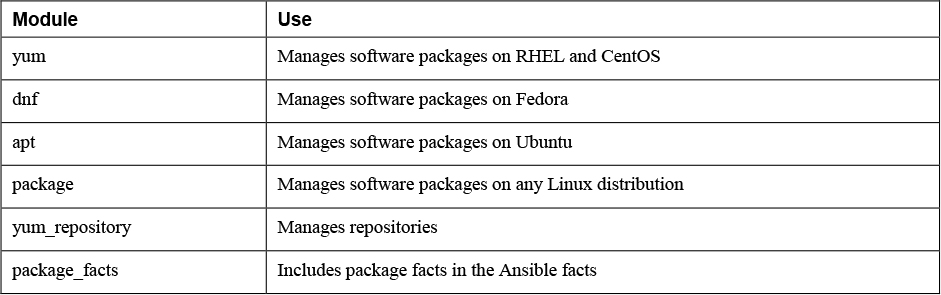
Image Image

Configuring Repository Access

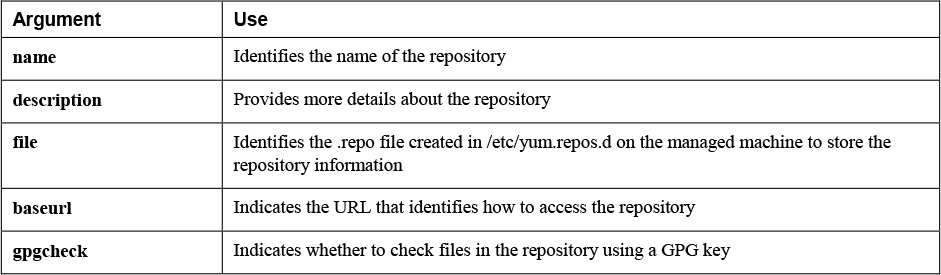
The yum_repository module lets you work with yum repository files in the /etc/yum.repos.d/ directory.

    ---
    - name: setting up repository access
      hosts: all
      tasks:
      - name: connect to example repo
        yum_repository:
          name: example repo
          description: RHCE8 example repo
          file: examplerepo
          baseurl: ftp://control.example.com/repo/
          gpgcheck: no

yum_repository Key Arguments

Image Image

  • gpgcheck argument is recommended but not mandatory.
  • Most repositories are provided with a GPG key to verify that packages in the repository have not been tampered with.
  • If no GPG key is set up for the repository, the gpgcheck parameter can be set to no to skip checking the GPG key.

Managing Software with yum

yum module

  • Used to manage software packages.
  • install, remove, or update packages.
  • Individual packages, as well as package groups and modules.

Perform a System Update:

- name: system update
  yum:
    name: '*'
    state: latest

To prevent the wildcard from being interpreted by the shell, you must make sure it is placed between single quotes.

Use Yum package groups to install the Virtualization Host package group:

---
- name: install or update a package group
  hosts: ansible2
  tasks:
  - name: install or update a package group
    yum:
      name: '@Virtualization Host'
      state: latest
  • Name of the package group needs to start with an @ sign and the entire package group name needs to be put between single quotes.

  • state: latest insures they are installed if they have not been installed yet.

  • If they have already been installed, they are updated to the latest version.

  • Modules as listed by the Linux yum modules list command can be managed with the Ansible yum module also.

  • Working with yum modules is similar to working with yum package groups.

  • The main difference is that a version number and the installation profile are included in the module name.

---
- name: installing an AppStream module
  hosts: ansible2
  tasks:
  - name: install or update an AppStream module
    yum:
      name: '@php:7.3/devel'
      state: present

Managing Package Facts

  • When Ansible is gathering facts, package facts are not included.
  • To include package facts as well, you need to run a separate task

package_facts module

  • Facts that have been gathered about packages are stored to the ansible_facts.packages variable.
---
- name: using package facts
  hosts: ansible2
  vars:
    my_package: nmap
  tasks:
  - name: install package
    yum:
      name: "{{ my_package }}"
      state: present
  - name: update package facts
    package_facts:
      manager: auto
  - name: show package facts for {{ my_package }}
    debug:
      var: ansible_facts.packages[my_package]
    when: my_package in ansible_facts.packages

manager argument

  • Specifies which package manager to communicate to.
  • Default value of auto automatically detects the appropriate package manager and uses that.
  • You can specify the package manager manually, using any package manager such as yum or dnf.

Install virt-manager and show the package facts:

---
- name: exercise121
  hosts: ansible2
  vars:
    my_package: virt-manager
  tasks:

- name: install package
  yum:
    name: "{{ my_package }}"
    state: present
    
- name: update package facts
  package_facts:
    manager: auto

- name: show package facts for {{ my_package }}
  debug:
    var: ansible_facts.packages[my_package]
  when: my_package in ansible_facts.packages

Using Modules to Manage Repositories and Subscriptions

Setting Up Repositories

  • A repository is a directory that contains RPM files, as well as the repository metadata, which is an index that allows the repository client to figure out which packages are available in the repository.

Ansible does not provide a specific module to set up a repository.

To set up an FTP-based repository on the Ansible control host, you need to accomplish the following tasks:

• Install the FTP package. • Start and enable the FTP server. • Open the firewall for FTP traffic. • Make sure the FTP shared repository directory is available. • Download packages to the repository directory. • Use the Linux createrepo command to generate the index that is required in each repository.

- name: install FTP to export repo
  hosts: localhost
  tasks:
  - name: install FTP server
    yum:
      name:
      - vsftpd
      - createrepo_c
      state: latest
  - name: start FTP server
    service:
      name: vsftpd
      state: started
      enabled: yes
  - name: open firewall for FTP
    firewalld:
      service: ftp
      state: enabled
      permanent: yes

- name: setup the repo directory
  hosts: localhost
  tasks:
  - name: make directory
    file:
      path: /var/ftp/repo
      state: directory
  - name: download packages
    yum:
      name: nmap
      download_only: yes
      download_dir: /var/ftp/repo
  - name: createrepo
    command: createrepo /var/ftp/repo
  • yum module is used to download a single package.

download_only

  • Used to ensure that the package is not installed but downloaded to a directory.

  • Must specify where the package needs to be installed with download_dir argument. download_dir

  • Specify where to download to

  • Requires repository access. If repository access is not available, the fetch module can be used instead to download a file from a specific URL.

Managing GPG Keys

rpm_key module.

  • to make sure the client knows where to fetch the repository key.

Doesn’t work because no GPG-protected repository is available:

- name: use rpm_key in repository access
  hosts: all
  tasks:
  - name: get the GPG public key
    rpm_key:
     key: ftp://control.example.com/repo/RPM-GPG-KEY
      state: present
  - name: set up the repository client
    yum_repository:
      file: myrepo
      name: myrepo
      description: example repo
      baseurl: ftp://control.example.com/repo
      enabled: yes
      gpgcheck: yes
      state: present

Managing RHEL Subscriptions

redhat_subscription module

  • enables you to perform subscription and registration in one task.

rhsm_repository module

  • Enables you to add subscription manager repositories.
---
- name: use subscription manager to register and set up repos
  hosts: ansible5
  tasks:
  - name: register and subscribe ansible5
    redhat_subscription:
      username: bob@example.com
      password: verysecretpassword
      state: present
  - name: configure additional repo access
    rhsm_repository:
      name:
      - rh-gluster-3-client-for-rhel-8-x86_64-rpms
      - rhel-8-for-x86_64-appstream-debug-rpms
      state: present

In Exercise 12-2 you are guided through the procedure of setting up your own repository and using it. This procedure consists of two distinct parts. In the first part you set up a repository server that is based on FTP. Because in Ansible you often need to configure topics that don’t have your primary attention, you set up the FTP server and also change its configuration. Next, you write a second playbook that configures the clients with appropriate repository access, and after doing so, install a package.

Setting Up a Repository

FTP Server

---
- name: install, configure, start and enable FTP
  hosts: localhost
  tasks:
  - name: install FTP server
    yum:
      name: vsftpd
      state: latest
  - name: allow anonymous access to FTP
    lineinfile:
      path: /etc/vsftpd/vsftpd.conf
      regexp: ’^anonymous_enable=NO’
      line: anonymous_enable=YES
  - name: start FTP server
    service:
      name: vsftpd
      state: started
      enabled: yes
  - name: open firewall for FTP
    firewalld:
      service: ftp
      state: enabled
      immediate: yes
      permanent: yes

- name: setup the repo directory
  hosts: localhost
  tasks:
  - name: make directory
    file:
      path: /var/ftp/repo
      state: directory
  - name: download packages
    yum:
      name: nmap
      download_only: yes
      download_dir: /var/ftp/repo
  - name: install createrepo package
    yum:
      name: createrepo_c
      state: latest
  - name: createrepo
    command: createrepo /var/ftp/repo
    notify:
    - restart_ftp
  handlers:
  - name: restart_ftp
    service:
      name: vsftpd
      state: restarted

Client

---
- name: configure repository
  hosts: all
  vars:
    my_package: nmap
  tasks:

- name: connect to example repo
  yum_repository:
    name: exercise122
    description: RHCE8 exercise 122 repo
    file: exercise122
    baseurl: ftp://control.example.com/repo/
    gpgcheck: no

- name: ensure control is resolvable
  lineinfile:
    path: /etc/hosts
    line: 192.168.4.200  control.example.com  control

- name: install package
  yum:
    name: "{{ my_package }}"
    state: present

- name: update package facts
  package_facts:
    manager: auto

- name: show package facts for {{ my_package }}
  debug:
    var: ansible_facts.packages[my_package]
  when: my_package in ansible_facts.packages

Use the playbook to install redis: ansible-playbook exercise122-client.yaml -e my_package=redis

Implementing a Playbook to Manage Software

https://github.com/sandervanvugt/rhce8-book/exercise123.yaml.

- name: add host to inventory
  hosts: localhost
  tasks:
  - fail:
      msg: "add the options -e newhost=hostname -e newhostip=ip.ad.dr.ess and try again"
    when: (newhost is undefined) or (newhostip is undefined)

  - name: add new host to inventory
    lineinfile:
      path: inventory
      state: present
      line: "{{ newhost }}"
  - name: add new host to /etc/hosts
    lineinfile:
      path: /etc/hosts
      state: present
      line: "{{ newhostip }}  {{ newhost}}"
  tags: addhost

- name: configure a new RHEL host
  hosts: "{{ newhost }}"
  remote_user: root
  become: false
  tasks:

  - name: configure user ansible
    user:
      name: ansible
      groups: wheel
      append: yes
      state: present

  - name: set a password for this user
    shell: ’echo password | passwd --stdin ansible’

  - name: enable sudo without passwords
    lineinfile:
      path: /etc/sudoers
      regexp: ’^%wheel’
      line: ’%wheel ALL=(ALL)  NOPASSWD: ALL’
      validate: /usr/sbin/visudo -cf %s

  - name: create SSH directory in user ansible home
    file:
      path: /home/ansible/.ssh
      state: directory
      owner: ansible
      group: ansible

  - name: copy SSH public key to remote host
    copy:
      src: /home/ansible/.ssh/id_rsa.pub
      dest: /home/ansible/.ssh/authorized_keys
  tags: setuphost

- name: use subscription manager to register and set up repos
  hosts: "{{ newhost }}"
  vars_files:
  - exercise123-vault.yaml
  tasks:
  - name: register and subscribe {{ newhost }}
    redhat_subscription:
      username: "{{ rhsm_user }}"
      password: "{{ rhsm_password }}"
      state: present

  - name: configure additional repo access
    rhsm_repository:
      name:
      - rh-gluster-3-client-for-rhel-8-x86_64-rpms
      - rhel-8-for-x86_64-appstream-debug-rpms
      state: present
  tags: registerhost

Add user and pass to vault:

rhsm_user: XXXXXXXXXXX
rhsm_password: XXXXXXXXXXX

To test: ansible-playbook -C -k exercise123.yaml -e newhost=ansible5 -e newhostip=192.168.4.205

To run: ansible-playbook -k --ask-vault-pass exercise123.yaml -e newhost=ansible5 -e newhostip=192.168.4.205 command. Everything

Lab 12-1

Configure the control.example.com host as a repository server, according to the following requirements:

• Create a directory with the name /repo, and in that directory copy all packages that have a name starting with nginx.

• Generate the metadata that makes this directory a repository.

• Configure the Apache web server to provide access to the repository server. You just have to make sure that the DocumentRoot in Apache is going to be set to the /repo directory.

Lab 12-2

Write a playbook to configure all managed servers according to the following requirements:

• All hosts can access the repository that was created in Lab 12-1.

• Have the same playbook install the nginx package.

• Do NOT start the service. Use the appropriate module to gather information about the installed nginx package, and let the playbook print a message stating the name of the nginx package as well as the version.

Practice exam task, edited.

This is a task from this practice exam. But edited for rhel9

https://repo.mysql.com/yum/mysql-8.4-community/el/9/x86_64/

Task 8: Software Repositories

Create a playbookĀ /home/automation/plays/repository.ymlĀ that runs on servers in theĀ databaseĀ host group and does the following:

  1. A YUM repository file is created.
  2. The name of the repository isĀ mysql84-community.
  3. The description of the repository is ā€œMySQL 8.4 YUM Repoā€.
  4. Repository baseurl isĀ https://repo.mysql.com/yum/mysql-8.4-community/el/9/x86_64/.
  5. Repository GPG key is atĀ https://repo.mysql.com/RPM-GPG-KEY-mysql-2023.
  6. Repository GPG check is enabled.
  7. Repository is enabled.