Using Modules for Troubleshooting and Testing
Here are some common modules to help you troubleshoot:
debug: View the values of variables. uri: Test responses from a URL. And is useful for API calls. fail: Uses when to determine when a module should fail. script: Execute a shell script on the target host. stat: Gather status information on a file. assert: Test whether an expected result is present. Fails if not.
debug Module
Sometimes you need to be sure of a variable value at a certain point in a playbook.
Arguments
msg: Used to print a message. var: Used to print the value of a variable. Does not need curly brackets to reference variable.
uri Module
The uri module is used to verify connectivity to a web server through http or https.
Show result of the command:
Show the status code returned by a site:
Arguments
return_content: Gets the web server content, which can be stored as a variable using register.
You can also use uri to check accessibility or information from an API endpoint.
stat Module
The stat module is used to check a file for properties. You can use it with register, fail, and when to check the status of a file. Then perform an action depending on if the file passes or fails that check.
Listing 11-9 Using stat to Check Expected File Status
assert Module
Used to match conditionals to perform an action. If any of the conditionals are false, the task fails.
Arguments
that: Defines a list of conditionals.
success_msg: Print message on success fail_msg: Print a message on failure
Note: vars_prompt variable type is string by default.
int comes from Ansible using Jinja2 filters.
Troubleshooting Common Scenarios
Analyzing Connectivity Issues
ansible_host parameter
- If a host resolves to multiple IP addresses, you may want to specify how exactly the remote host must be connected to.
- In inventory:
ansible5.example.com ansible_host=192.168.4.55
ping module.
- checks for IP connectivity, accessibility of the SSH service, sudo privilege escalation, and the availability of a Python stack.
- does not take any arguments.
Analyzing Authentication Issues
A few settings play a role in authentication on the remote host to execute tasks:
remote_user
- Which user account to use on the managed nodes.
SSH keys need to be configured for the remote_user to enable smooth authentication.
become
- needs to be set to true.
become_user
- needs to be set to the root user account.
Linux sudo needs to be set up correctly.
Managing Ansible Errors and Logs
Check Mode
- Run a playbook without actually changing anything.
–check or -C command-line argument to the ansible or ansible-playbook command.
-
Changes that would have been made are shown but not executed.
-
Not supported in all cases.
-
Problems if it is applied to conditionals, where a specific task can do its work only after a preceding task has made some changes.
-
Modules have to support it. Some don’t.
-
Modules that don’t support check mode don’t show any result while running check mode, but also they don’t make any changes.
-
Can use check_mode: yes/no with any task in a playbook.
-
The task always runs (or does not run) in check mode regardless of the use of the --check option.
--diff
- Used with check option.
- Reports changes to template files without actually applying them.
ansible@control rhce8-book]$ ansible-playbook listing111.yaml --check --diff
–syntax-check
- Check playbook syntax
Understanding Output
ansible-playbook Command Output
• An indicator of the play that is started. • If not disabled, the Gathering Facts task that is executed for each play. • Each individual task, including the task name if that was specified. • The Play Recap, which summarizes the play results.
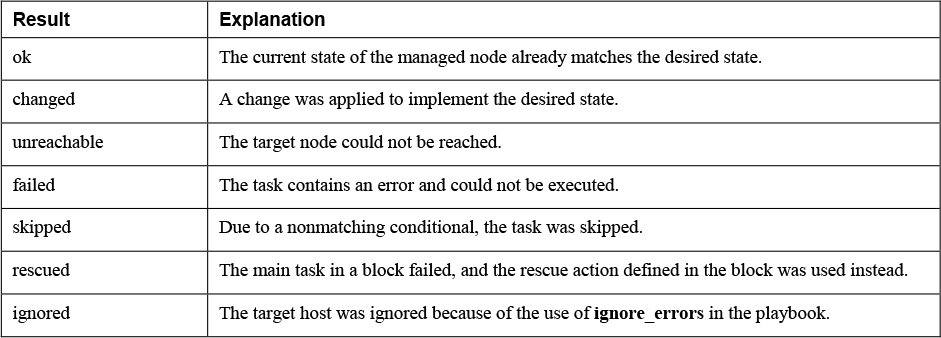
Playbook Recap Overview
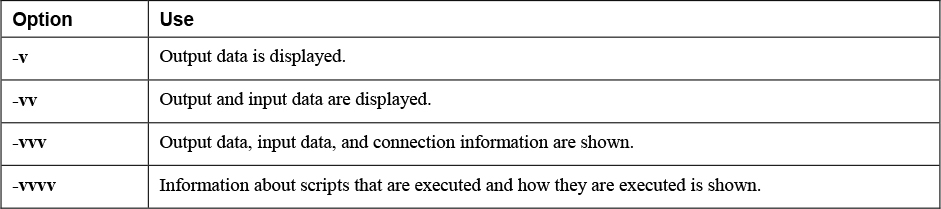
Verbosity options
Optimizing Command Output Error Formatting
stdout_callback = debug and stdout_callback = error.
- include in ansible.cfg to make error output more readable.
Logging to Files
- Ansible does not write anything to log files by default.
- You can redirect std_out to a file or set the log_path parameter in ansible.cfg.
- Can also log to the filename that is specified as the argument to the $ANSIBLE_LOG_PATH variable.
- make sure that Linux log rotation is configured to ensure that files cannot grow beyond a specific maximum size.
Running Task by Task
ansible-playbook --step
- Runs playbook task by task and prompt for confirmation before running the next task. ansible-playbook --start-at-task="task name"
- Start playbook execution as a specific task.
ansible-playbook --list-tasks
- Get a list of all tasks that have been configured. T