DNS
DNS and Name Resolution
- DNS is also referred to as BIND (Berkeley Internet Name Domain)
- An implementation of DNS,
- Most popular DNS application in use.
- Name resolution is the technique that uses DNS/BIND for hostname lookups.
DNS Name Space and Domains
- DNS name space is a
- Hierarchical organization of all the domains on the Internet.
- Root of the name space is represented by a period (.)
- Hierarchy below the root (.) denotes the top-level domains (TLDs) with names such as .com, .net, .edu, .org, .gov, .ca, and .de.
- A DNS domain is a collection of one or more systems. Subdomains fall under their parent domains and are separated by a period (.). root of the name space is represented by a period ( - redhat.com is a second-level subdomain that falls under .com, and bugzilla.redhat.com is a third-level subdomain that falls under redhat.com.
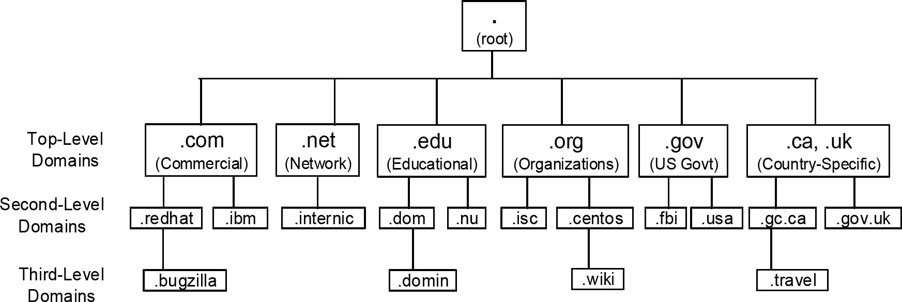
- Deepest level of the hierarchy are the leaves (systems, nodes, or any device with an IP address) of the name space.
- a network switch net01 in .travel.gc.ca subdomain will be known as net01.travel.gc.ca.
- If a period (.) is added to the end of this name to look like net01.travel.gc.ca., it will be referred to as the Fully Qualified Domain Name (FQDN) for net01.
DNS Roles
A DNS system or nameserver can be a
- primary server
- secondary server
- or client
Primary server
- Responsible for its domain (or subdomain).
- Maintains a master database of all the hostnames and their associated IP addresses that are included in that domain.
- All changes in the database are done on this server.
- Each domain must have one primary server with one or more optional secondary servers for load balancing and redundancy.
Secondary server
- Stores an updated copy of the master database.
- Provide name resolution service in the event the primary server goes down.
Client
- Queries nameservers for name lookups.
- DNS client on Linux involves two text files.
- /etc/resolv.conf
/etc/resolv.conf
- DNS resolver configuration file where information to support hostname lookups is defined.
- May be edited manually with a text editor.
- Referenced by resolver utilities to construct and transmit queries.
Key directives
-
domain
-
nameserver
-
search
Directive Description
domain
- Identifies the default domain name to be searched for queries
nameserver
- Declares up to three DNS server IP addresses to be queried one at a time in the order in which they are listed. Nameserver entries may be defined as separate line items with the directive or on a single line.
search
- Specifies up to six domain names, of which the first must be the local domain. No need to define the domain directive if the search directive is used.
Sample entry
Variation
- Entries are automatically placed by the NetworkManager service.
- If this file is absent, the resolver utilities only query the nameserver configured on the localhost, determine the domain name from the hostname of the system, and construct the search path based on the domain name.
Viewing and Adjusting Name Resolution Sources and Order
/etc/nsswitch.conf
-
Directs the lookup utilities to the correct source to get hostname information.
-
Also identifies the order in which to consult source and an action to be taken next.
-
Four keywords oversee this behavior
- success
- notfoundq
- unavail
- tryagain
Keyword Meaning Default Action
success
- Information found in return (do not try the source and provided to next source) the requester.
notfound
- Information not found continue (try the next in source source).
unavail
- Source down or not continue (try the next responding; service source) disabled or not configured.
tryagain
- Source busy, retry continue (try the next later source).
Example shows two sources for name resolution: files (/etc/hosts) and DNS (/etc/resolv.conf).
- Default behavior
- Search will terminate if the requested information is found in the hosts table.
Instruct the lookup programs to return if the requested information is not found there:
- Query tools available in RHEL 9:
dighostnslookupgetent
dig command (domain information groper)
- DNS lookup utility.
- Queries the nameserver specified at the command line or consults the resolv.conf file to determine the nameservers to be queried.
- May be used to troubleshoot DNS issues due to its flexibility and verbosity.
To get the IP for redhat.com using the nameserver listed in the resolv.conf file:
To perform a reverse lookup on the redhat.com IP (52.200.142.250), use the -x option with the command:
host Command
- Works on the same principles as the
digcommand in terms of nameserver determination. - Produces less data in the output by default.
- -v option if you want more info.
Perform a lookup on redhat.com:
Rerun with -v added:
Perform a reverse lookup on the IP of redhat.com with verbosity:
nslookup Command
- Queries the nameservers listed in the resolv.conf file or specified at the command line.
- See man pages for interactive mode
Get the IP for redhat.com using nameserver 8.8.8.8 instead of the nameserver defined in resolv.conf:
Perform a reverse lookup on the IP of redhat.com using the nameserver from the resolver configuration file:
getent Command
- Fetch matching entries from the databases defined in the nsswitch.conf file.
- Reads the corresponding database and displays the information if found.
- For name resolution, use the hosts database and
getentwill attempt to resolve the specified hostname or IP address.
Run the following for forward and reverse lookups:
Hostname
- “-”, “_ “, and “. " characters are allowed.
- Up to 253 characters.
- Stored in /etc/hostname.
- Can be viewed with several different commands, such as
hostname,hostnamectl,uname, andnmcli, as well as by displaying the content of the /etc/hostname file.
View the hostname:
Lab: Change the Hostname
Server1
- Open /etc/hostname and change the entry to server10.example.com
- restart the systemd-hostnamed service daemon
- confirm
server2
- Change the hostname with hostnamectl:
-
Log out and back in for the prompt to update
-
Change the hostname using nmcli