Security Enhanced Linux
SELinux Terminology
-
Implementation of the Mandatory Access Control (MAC) architecture
- developed by the U.S. National Security Agency (NSA)
- flexible, enriched, and granular security controls in Linux.
- integrated into the Linux kernel as a set of patches using the Linux Security Modules (LSM) framework
- allows the kernel to support various security implementations
- provides an added layer of protection above and beyond the standard Linux Discretionary Access Control (DAC) security architecture.
- DAC includes:
- traditional file and directory permissions
- extended attribute settings
- setuid/setgid bits
- su/sudo privileges
- etc.
- Limits the ability of a subject (Linux user or process) to access an object (file, directory, file system, device, network interface/connection, port, pipe, socket, etc.)
- To reduce or eliminate the potential damage the subject may be able to inflict on the system if compromised.
-
MAC controls
- Fine-grained
- Protect other services in the event one service is negotiated.
- Example:
- If the HTTP service process is compromised, the attacker can only damage the files the hacked process will have access to, and not the other processes running on the system, or the objects the other processes will have access to.
- To ensure this coarse-grained control, MAC uses a set of defined authorization rules called policy to examine security attributes associated with subjects and objects when a subject tries to access an object, and decides whether to permit the access attempt.
- These attributes are stored in contexts (a.k.a. labels), and are applied to both subjects and objects.
-
SELinux decisions are stored in a special cache area called Access Vector Cache (AVC).
-
This cache area is checked for each access attempt by a process to determine whether the access attempt was previously allowed.
-
With this mechanism in place, SELinux does not have to check the policy ruleset repeatedly, thus improving performance.
-
SELinux is enabled by default
- Confines processes to the bare minimum privileges that they need to function.
Key Terms
Subject
- Any user or process that accesses an object.
- Examples:
- system_u for the SELinux system user
- unconfined_u for subjects that are not bound by the SELinux policy
- Stored in field 1 of the context.
Object
- A resource, such as a file, directory, hardware device, network interface/connection, port, pipe, or socket, that a subject accesses.
- Examples:
- object_r for general objects
- system_r for system-owned objects
- unconfined_r for objects that are not bound by the SELinux policy.
Access
- An action performed by the subject on an object.
- Examples:
- creating, reading, or updating a file
- creating or navigating a directory
- accessing a network port or socket
Policy
- A defined ruleset that is enforced system-wide
- Used to analyze security attributes assigned to subjects and objects.
- Referenced to decide whether to permit a subject’s access attempt to an object, or a subject’s attempt to interact with another subject.
- The default behavior of SELinux in the absence of a rule is to deny the access.
- Standard preconfigured policies:
- targeted (default)
- Any process that is targeted runs in a confined domain
- Any process that is not targeted runs in an unconfined domain.
- Example:
- SELinux runs logged-in users in the unconfined domain, and the httpd process in a confined domain by default.
- Any subject running unconfined is more vulnerable than the one running confined.
- mls
- Places tight security controls at deeper levels.
- minimum
- light version of the targeted policy
- designed to protect only selected processes.
- targeted (default)
Context (label)
- A tag to store security attributes for subjects and objects.
- Every subject and object has a context assigned
- Consists of a SELinux user, role, type (or domain), and sensitivity level.
- Used by SELinux to make access control decisions.
Labeling
- Mapping of files with their stored contexts.
SELinux User
- Several predefined SELinux user identities that are authorized for a particular set of roles.
- Linux user to SELinux user identity mapping to place SELinux user restrictions on Linux users.
- Controls what roles and levels a process (with a particular SELinux user identity) can enter.
- Example:
- A Linux user cannot run the
suandsudocommands or the programs located in their home directories if they are mapped to the SELinux user user_u.
- A Linux user cannot run the
Role
- An attribute of the Role-Based Access Control (RBAC) security model that is part of SELinux.
- Classifies who (subject) is allowed to access what (domains or types).
- SELinux users are authorized for roles, and roles are authorized for domains and types.
- Each subject has an associated role to ensure that the system and user processes are separated.
- A subject can transition into a new role to gain access to other domains and types.
- Examples:
- user_r for ordinary users
- sysadm_r for administrators
- system_r for processes that initiate under the system_r role
- Stored in field 2 of the context.
Type Enforcement (TE)
- Identifies and limits a subject’s ability to access domains for processes, and types for files.
- References the contexts of the subjects and objects for this enforcement.
Type
- Attribute of type enforcement.
- Group of objects based on uniformity in their security requirements.
- Objects such as files and directories with common security requirements, are grouped within a specific type.
- Examples:
- user_home_dir_t for objects located in user home directories
- usr_t for most objects stored in the /usr directory.
- Stored in field 3 of a file context.
Domain
- Determines the type of access that a process has.
- Processes with common security requirements are grouped within a specific domain type, and they run confined within that domain.
- Examples:
- init_t for the systemd process
- firewalld_t for the firewalld process
- unconfined_t for all processes that are not bound by SELinux policy.
- Stored in field 3 of a process context.
Rules
- Outline how types can access each other, domains can access types, and domains can access each other.
Level
- An attribute of Multi-Level Security (MLS) and Multi-Category Security (MCS).
- Pair of sensitivity:category values that defines the level of security in the context.
- category may be defined as a single value or a range of values, such as c0.c4 to represent c0 through c4.
- In RHEL 9, the targeted policy is used as the default, which enforces MCS (MCS supports only one sensitivity level (s0) with 0 to 1023 different categories).
SELinux Contexts
SELinux Contexts for Users
- SELinux contexts define security attributes placed on subjects and objects.
- Each context contains a type and a security level with subject and object information.
Use the id command with the -Z option to view the context set on Linux users:
Output:
-
Mapped to the SELinux unconfined_u user
-
No SELinux restrictions placed on this user.
-
All Linux users, including root, run unconfined by default, (full system access)
-
Seven confined user identities with restricted access to objects.
- Mapped to Linux users via SELinux policy.
- Helps safeguard the system from potential damage that Linux users might inflict on the system.
Use the seinfo query command to list the SELinux users; however, the setools-console software package must be installed before doing so.
Use the semanage command to view the mapping between Linux and SELinux users:
MLS/MCS Range
- Associated security level and the context for the Linux user (the * represents all services).
- By default, all non-root Linux users are represented as
__default__, which is mapped to the unconfined_u user in the policy.
SELinux Contexts for Processes
Determine the context for processes using the ps command with the -Z flag:
Output:
-
The subject system_u is a SELinux username (mapped to Linux user root)
-
Object is system_r
-
Domain init_t reveals the type of protection applied to the process.
-
Level of security
s0 -
A process that is unprotected will run in the unconfined_t domain.
SELinux Contexts for Files
ls -Z
- View context for files and directories.
Show the four attributes set on the /etc/passwd file:
- Subject system_u
- Object object_r
- Type
passwd_file_t - Security level
s0for the passwd file.
/etc/selinux/targeted/contexts/files/file_contexts /etc/selinux/targeted/contexts/files/file_contexts.local
- Stores contexts for system-installed and user-created files.
- Policy files.
- Can be updated using the
semanagecommand.
Copying, Moving, and Archiving Files with SELinux Contexts
- All files in RHEL are labeled with an SELINUX security context by default.
- New files inherit the parent directory’s context at the time of creation.
Rules for copy move and archive:
-
If a file is copied to a different directory, the destination file will receive the destination directory’s context, unless the
--preserve=contextswitch is specified with thecpcommand to retain the source file’s original context. -
If a copy operation overwrites the destination file in the same or different directory, the file being copied will receive the context of the overwritten file, unless the
--preserve=contextswitch is specified with thecpcommand to preserve the source file’s original context. -
If a file is moved to the same or different directory, the SELinux context will remain intact, which may differ from the destination directory’s context.
-
If a file is archived with the tar command, use the
--selinuxoption to preserve the context.
SELinux Contexts for Ports
View attributes for network ports with the semanage command:
- By default, SELinux allows services to listen on a restricted set of network ports only.
Domain Transitioning
- SELinux allows a process running in one domain to enter another domain to execute an application that is restricted to run in that domain only.
- A rule must exist in the policy to support such transition.
- entrypoint
- Permission setting
- Control processes that can transition into another domain.
Example:
What happens when a Linux user attempts to change their password using the /usr/bin/passwd command.
The passwd command is labeled with the passwd_exec_t type:
The passwd command requires access to the /etc/shadow file in order to modify a user password. The shadow file has a different type set on it
(shadow_t):
- The SELinux policy has rules that specifically allow processes running in domain passwd_t to read and modify the files with type shadow_t, and allow them entrypoint permission into domain passwd_exec_t.
- This rule enables the user’s shell process executing the
passwdcommand to switch into the passwd_t domain and update the shadow file.
Open two terminal windows. In window 1, issue the passwd command as user1 and wait at the prompt:
In window 2, run the ps command:
- The
passwdcommand (process) transitioned into the passwd_t domain to change the user password.
SELinux Booleans
- on/off switches that SELinux uses to determine whether to permit an action.
- Activate or deactivate certain rule in the SELinux policy immediately and without the need to recompile or reload the policy.
- For instance, the ftpd_anon_write Boolean can be turned on to enable anonymous users to upload files.
- This privilege can be revoked by turning this Boolean off.
- Boolean values are stored in virtual files located in /sys/fs/selinux/booleans/.
- The filenames match the Boolean names.
A sample listing of this directory is provided below:
-
The manual pages of the Booleans are available through the
selinux-policy-docpackage. -
Once installed, use the
-Koption with themancommand to bring the pages up for a specific Boolean. -
For instance, issue
man -K abrt_anon_writeto view the manual pages for theabrt_anon_writeBoolean. -
Can be viewed, and flipped temporarily or for permanence.
-
New value takes effect right away.
-
Temporary changes are stored as a “1” or “0” in the corresponding Boolean file in the /sys/fs/selinux/booleans/
-
Permanent changes are saved in the policy database.
SELinux Administration
- Controlling the activation mode, checking operational status, setting security contexts on subjects and objects, and switching Boolean values.
Utilities and the commands they provide
libselinux-utilsgetenforcegetsebool
policycoreutilssestatussetseboolrestorecon
policycoreutils-python-utilssemanage
setools-consoleseinfosesearch
SELinux Alert Browser
-
Graphical tool for viewing alerts and debugging SELinux issues.
-
Part of the
setroubleshoot-serverpackage. -
In order to fully manage SELinux, you need to ensure that all these packages are installed on the system.
Management Commands
SELinux delivers a variety of commands for effective administration. Table 20-1 lists and describes the commands mentioned above plus a few more under various management categories.
Mode Management
getenforce
- Displays the current mode of operation
grubby
- Updates and displays information about the configuration files for the grub2 boot loader
sestatus
- Shows SELinux runtime status and Boolean values
setenforce
- Switches the operating mode between enforcing and permissive temporarily
Context Management
chcon
- Changes context on files (changes do not survive file system relabeling)
restorecon
- Restores default contexts on files by referencing the files in /etc/selinux/targeted/contexts/files/
semanage
- Changes context on files with the
fcontextsubcommand (changes survive file system relabeling)
Policy Management
seinfo
- Provides information on policy components
semanage
- Manages policy database
sesearch
- Searches rules in the policy database
Boolean Management
getsebool
- Displays Booleans and their current settings.
setsebool
- Modifies Boolean values temporarily, or in the policy database.
semanage
- Modifies Boolean values in the policy database with the
booleansubcommand.
Troubleshooting
sealert
- The graphical troubleshooting tool
Viewing and Controlling SELinux Operational State
/etc/selinux/config
- One of the key configuration files that controls the SELinux operational state, and sets its default type
The default content of the file is displayed below:
Directives:
SELINUX
- Sets the activation mode for SELinux.
- Enforcing activates it and allows or denies actions based on the policy rules.
- Permissive activates SELinux, but permits all actions.
- It records all security violations.
- Useful for troubleshooting and developing or tuning the policy.
- The third option is to completely turn SELinux off. When running in enforcing mode
SELINUXTYPE
- Dictates the type of policy to be enforced.
- Default is targeted.
Determine the current operating mode:
getenforce
Change the state to permissive and verify:
- Can also “0” for permissive and a “1” for enforcing.
- Changes will be lost at the next system reboot.
- Edit /etc/selinux/config SELINUX directive to the desired mode for persistence.
EXAM TIP: You may switch SELinux to permissive for troubleshooting a non-functioning service. Don’t forget to change it back to enforcing when the issue is resolved.
Disable SELinux persistently:
grubby --update-kernel ALL --args selinux=0
- Appends the selinux=0 setting to the end of the “options” line in the bootloader configuration file located in the /boot/loader/entries directory:
Revert the above:
grubby --update-kernel ALL --remove-args selinux=0
Querying Status
sestatus Command
- View the current runtime status of SELinux
- Displays the location of principal directories, the policy in effect, and the activation mode.
-v
- Report on security contexts set on files and processes, as listed in /etc/sestatus.conf .
- Reports the contexts for the current process (Current context) and the init (systemd) process (Init context) under Process Contexts.
- Reveals the file contexts for the controlling terminal and associated files under File Contexts.
Lab: Modify SELinux File Context
- Create a directory sedir1 under /tmp and a file sefile1 under sedir1.
- Check the context on the directory and file.
- Change the SELinux user and type to user_u and public_content_t on both and verify.
1. Create the hierarchy sedir1/sefile1 under /tmp:
2. Determine the context on the new directory and file:
3. Modify the SELinux user (-u) on the directory to user_u and type
(-t) to public_content_t recursively (-R) with the chcon command:
4. Validate the new context:
Lab: Add and Apply File Context
- Add the current context on sedir1 to the SELinux policy database to ensure a relabeling will not reset it to its previous value
- Change the context on the directory to some random values.
- Restore the default context from the policy database back to the directory recursively.
- Determine the current context:
- Add (-a) the directory recursively to the policy database using the
semanagecommand with thefcontextsubcommand:
- The regular expression (/.*)? instructs the command to include all files and subdirectories under /tmp/sedir1.
- Needed only if recursion is required.
The above command added the context to the /etc/selinux/targeted/contexts/files/file_contexts.local file.
- Validate the addition by listing (-l) the recent changes (-C) in the policy database:
- Change the current context on sedir1 to something random (staff_u/etc_t) with the
chconcommand:
- The security context is changed successfully. Confirm with the
lscommand:
- Reinstate the context on the sedir1 directory recursively (
-R) as stored in the policy database using therestoreconcommand: (-F option will update all attributes, only does type by default. )
Lab: Add and Delete Network Ports
- Add a non-standard network port 8010 to the SELinux policy database for the httpd service.
- Confirm the addition.
- Remove the port from the policy and verify the deletion.
- List (
-l) the ports for the httpd service as defined in the SELinux policy database:
The output reveals eight network ports the httpd process is currently allowed to listen on.
- Add port 8010 with type
http_port_tand protocol tcp to the policy:
- Confirm the addition:
- Delete port
8010from the policy and confirm:
EXAM TIP: Any non-standard port you want to use for any service, make certain to add it to the SELinux policy database with the correct type.
Lab: Copy Files with and without Context
- Create a file called sefile2 under /tmp and display its context.
- Copy this file to the /etc/default directory, and observe the change in the context.
- Remove sefile2 from /etc/default, and copy it again to the same destination, ensuring that the target file receives the source file’s context.
1. Create file sefile2 under /tmp and show context:
2. Copy this file to the /etc/default directory, and check the context again:
3. Erase the /etc/default/sefile2 file, and copy it again with the --preserve=context option:
4. List the file to view the context:
Exercise 20-5: View and Toggle SELinux Boolean Values
- Display the current state of the Boolean
nfs_export_all_rw. - Toggle its value temporarily, and reboot the system.
- Flip its value persistently after the system has been back up.
1. Display the current setting of the Boolean nfs_export_all_rw using three different commands—getsebool, sestatus, and semanage:
2. Turn off the value of nfs_export_all_rw using the setsebool command by simply furnishing “off” or “0” with it and confirm:
3. Reboot the system and rerun the getsebool command to check the Boolean state:
4. Set the value of the Boolean persistently (-P or -m as needed) using either of the following:
5. Validate the new value using the getsebool, sestatus, or semanage command:
Monitoring and Analyzing SELinux Violations
-
SELinux generates alerts for system activities when it runs in enforcing or permissive mode.
-
It writes the alerts to /var/log/audit/audit.logif the auditd daemon is running, or to /var/log/messages via the rsyslog daemon in the absence of auditd.
-
SELinux also logs the alerts that are generated due to denial of an action, and identifies them with a type tag AVC (Access Vector Cache) in the audit.log file.
-
It also writes the rejection in the messages file with a message ID, and how to view the message details.
-
SELinux denial messages are analyzed, and the audit data is examined to identify the potential cause of the rejection.
-
The results of the analysis are recorded with recommendations on how to fix it.
-
These results can be reviewed to aid in troubleshooting, and recommended actions taken to address the issue.
-
SELinux runs a service daemon called setroubleshootd that performs this analysis and examination in the background.
-
This service also has a client interface called SELinux Troubleshooter (the
sealertcommand) that reads the data and displays it for assessment. -
The client tool has both text and graphical interfaces.
-
The server and client components are part of the
setroubleshoot-serversoftware package that must be installed on the system prior to using this service.
How SELinux handles an incoming access request (from a subject) to a target object:
Subject (eg: a process) makes an Action request (eg: read) > SELinux Security Server checks the SELinux Policy Database > if permission is not granted the AVC Denied Message is diaplayed. If Permission is granted, then access to object (eg: a file) is granted.
su to root from user1 and view the log:
WIll show avc denied if denied.
Lab Get an AVC deny message
- Change the SELinux type on the shadow file to something random (etc_t).
- Issue the
passwdcommand as user1 to modify the password. - Restored the type on the shadow file with
restorecon /etc/shadow. ' - Re-try the password change.
- Change the SELinux type on /etc/shadow to something random (etc_t)
- Issue the
passwdcommand as user1 to modify the password:
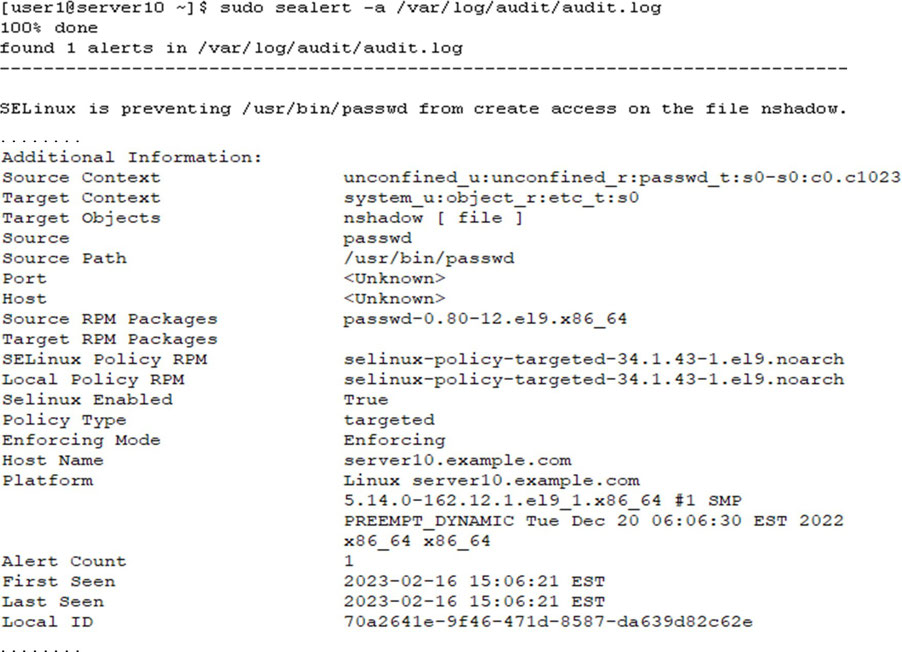
The following is a sample denial record from the same file in raw format:

- AVC type
- Related to the
passwdcommand (comm) - Source context (
scontext)unconfined_u:unconfined_r:passwd_t:s0-s0:c0.c1023 - nshadow file (name) with file type (tclass) “file”
- Target context (tcontext)
system_u:object_r:etc_t:s0 - Indicates the SELinux operating mode, which is enforcing
permissive=0. - This message indicates that the /etc/shadow file does not have the correct context set on it, and that’s why SELinux prevented the
passwdcommand from updating the user’s password.
Use sealert to analyze (-a) all AVC records in the audit.log file. This command produces a formatted report with all relevant details:
SELinux DIY Labs
Lab: Disable and Enable the SELinux Operating Mode
- Check and make a note of the current SELinux operating mode.
- Modify the configuration file and set the mode to disabled.
- Reboot the system to apply the change.
- Run
sudo getenforceto confirm the change when the system is up.
- Restore the directive’s value to enforcing in the configuration file, and reboot to apply the new mode.
- Run
sudo getenforceto confirm the mode when the system is up.
Lab: Modify Context on Files
- Create directory hierarchy /tmp/d1/d2.
- Check the contexts on /tmp/d1 and /tmp/d1/d2.
- Change the SELinux type on /tmp/d1 to
etc_trecursively with thechconcommand and confirm.
- Add /tmp/d1 to the policy database with the
semanagecommand to ensure the new context is persistent on the directory hierarchy.
Lab: Add Network Port to Policy Database
- Add network port 9005 to the SELinux policy database for the secure HTTP service using the semanage command.
- Verify the addition.
Lab: Copy Files with and without Context
- Create file sef1 under /tmp.
- Copy the file to the /usr/local directory.
- Check and compare the contexts on both source and destination files.
- Create another file sef2 under /tmp and copy it to the /var/local directory using the
--preserve=contextoption with thecpcommand.
- Check and compare the contexts on both source and destination files.
Lab: Flip SELinux Booleans
- Check the current value of Boolean
ssh_use_tcpdusing thegetseboolandsestatuscommands.
- Use the
setseboolcommand and toggle the value of the directive.
- Confirm the new value with the
getsebool,semanage, orsestatuscommand.