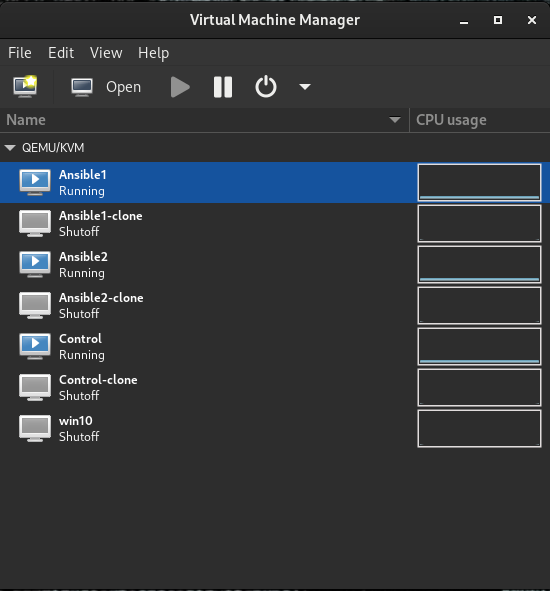
For this lab, we will need three virtual machines using RHEL 9. 1 control node and 2 managed nodes. Use IP addresses based on your lab network environment:
Hostname
pretty hostname
ip addreess
RAM
Storage
vCPUs
control.example.com
control
192.168.122.200
2048MB
20G
2
ansible1.example.com
ansible1
192.168.122.201
2048MB
20G
2
ansible2.example.com
ansible2
192.168.122.202
2048MB
20G
2
I have set these VMs up in virt-manager, then cloned them so I can rebuild the lab later. You can automate this using Vagrant or Ansible but that will come later. Ignore the Win10 VM. It’s a necessary evil:
Setting hostnames and verifying dependencies
Set a hostname on all three machines:
[root@localhost ~]# hostnamectl set-hostname control.example.com[root@localhost ~]# hostnamectl set-hostname --pretty control
Add a user for Ansible. This can be any username you like, but we will use “ansible” as our lab user. Also, the ansible user needs sudo access. We will also make it so no password is required for convenience. You will need to do this on the control node and both managed nodes:
Add this line to the file that comes up:
ansible ALL=(ALL) NOPASSWD: ALL
Configure a password for the ansible user:
[root@control ~]# passwd ansibleChanging password for user ansible.
New password:
BAD PASSWORD: The password is shorter than 8 characters
Retype new password:
passwd: all authentication tokens updated successfully.
On the control node only: Add host names of the nodes to /etc/hosts:
Log in to the ansible user account for the remaining steps. Note, Ansible assumes passwordless (key-based) login for ssh. If you insist on using passwords, add the –ask-pass (-k) flag to your Ansible commands. (This may require sshpass package to work)
On the control node only: Generate an ssh key to send to the hosts for passwordless Login:
[ansible@control ~]$ ssh-keygen -N "" -q
Enter file in which to save the key (/home/ansible/.ssh/id_rsa):
Copy the public key to the nodes and test passwordless access and test passwordless login to the managed nodes:
^C[ansible@control ~]$ ssh-copy-id ansible@ansible1
/usr/bin/ssh-copy-id: INFO: Source of key(s) to be installed: "/home/ansible/.ssh/id_rsa.pub"/usr/bin/ssh-copy-id: INFO: attempting to log in with the new key(s), to filter out any that are already installed
/usr/bin/ssh-copy-id: INFO: 1 key(s) remain to be installed -- if you are prompted now it is to install the new keys
ansible@ansible1's password:
Number of key(s) added: 1
Now try logging into the machine, with: "ssh 'ansible@ansible1'"
and check to make sure that only the key(s) you wanted were added.
[ansible@control ~]$ ssh-copy-id ansible@ansible2
/usr/bin/ssh-copy-id: INFO: Source of key(s) to be installed: "/home/ansible/.ssh/id_rsa.pub"
The authenticity of host 'ansible2 (192.168.124.202)' can't be established.
ED25519 key fingerprint is SHA256:r47sLc/WzVA4W4ifKk6w1gTnxB3Iim8K2K0KB82X9yo.
This key is not known by any other names
Are you sure you want to continue connecting (yes/no/[fingerprint])? yes
/usr/bin/ssh-copy-id: INFO: attempting to log in with the new key(s), to filter out any that are already installed
/usr/bin/ssh-copy-id: INFO: 1 key(s) remain to be installed -- if you are prompted now it is to install the new keys
ansible@ansible2's password:
Number of key(s) added: 1
Now try logging into the machine, with: "ssh 'ansible@ansible2'"
and check to make sure that only the key(s) you wanted were added.
[ansible@control ~]$ ssh ansible1
Register this system with Red Hat Insights: insights-client --register
Create an account or view all your systems at https://red.ht/insights-dashboard
Last failed login: Thu Apr 3 05:34:20 MST 2025 from 192.168.124.200 on ssh:notty
There was 1 failed login attempt since the last successful login.
[ansible@ansible1 ~]$logout
Connection to ansible1 closed.
[ansible@control ~]$ ssh ansible2
Register this system with Red Hat Insights: insights-client --register
Create an account or view all your systems at https://red.ht/insights-dashboard
[ansible@ansible2 ~]$logout
Connection to ansible2 closed.
Install lab stuff from the RHCE guide:
sudo dnf -y install git