Silverblue
Automated setup https://universal-blue.org/
You get all the benefits of using containers Separates system level packages from applications.
System Level
- Desktop, kernel?
- Layering
- Apps at system level because containers aren’t as developed yet
- Locks to the fedora version you are on
Layered package examples
- gnome shell extensions
- distrobox
Uses rpm-ostree? https://coreos.github.io/rpm-ostree/administrator-handbook/
Flatpacks
Remove fedora flatpack stuff and use flathub repos instead https://flatpak.org/setup/Fedora
Systemd unit for automatic flatpack updates
Update every 4 hours to mirror ubuntu
flatseal adjust permissions of flatpacks
check out apps.gnome.org
Rebase into Universal Blue
Rebase onto the “unsigned” image then reboot:
rpm-ostree rebase ostree-unverified-registry:ghcr.io/ublue-os/silverblue-main:39 and
Then the signed image and reboot:
rpm-ostree rebase ostree-image-signed:docker://ghcr.io/ublue-os/silverblue-main:39
Then do we you do after install, open the app store and install stuff via GUI or we
just
have a .justfile to install all flatpak/ homebrew packages https://universal-blue.discourse.group/t/introduction-to-just/42 https://just.systems/man/en/chapter_1.html
My justfile
Set up github dotfiles repo
Install chezmoi and initialize:
chezmoi init
Sync with Chezmoi: https://www.chezmoi.io/quick-start/
Add dotfiles
chezmoi add ~/.bashrc
Edit a dotfile
chezmoi edit ~/.bashrc
See changes
chezmoi diff
Apply changes
chezmoi -v apply
to sync chezmoi with git:
For subsequent git pushes:
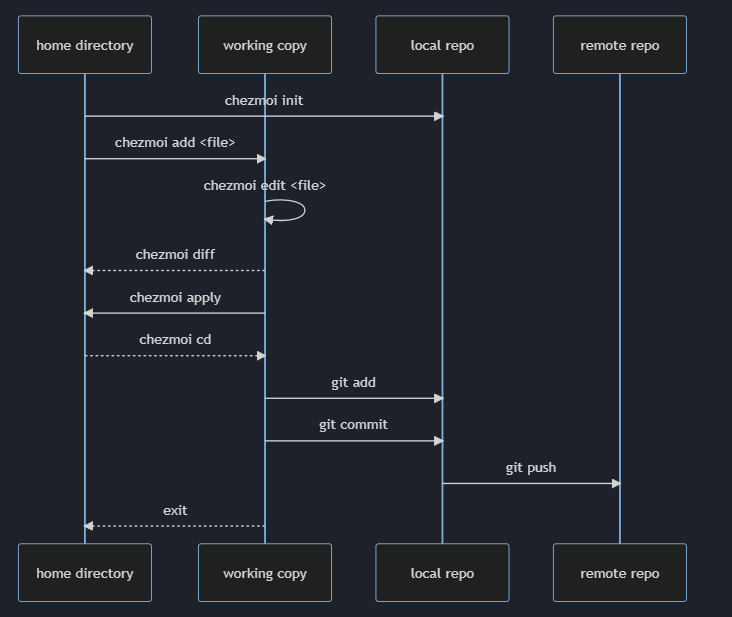
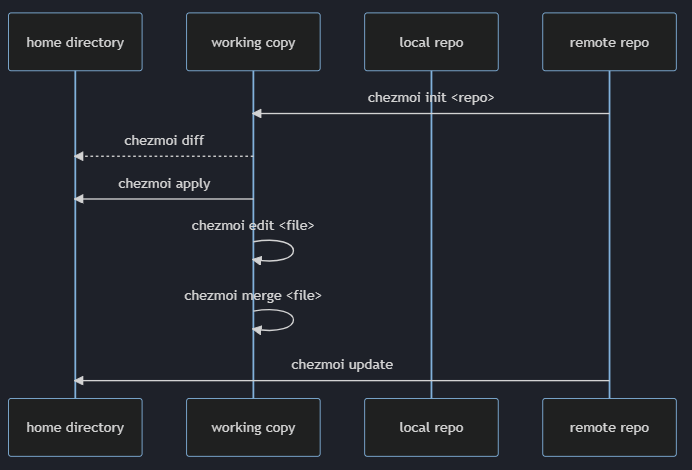
From a second machine:
Install all dotfiles with a single command:
chezmoi init --apply https://github.com/$GITHUB_USERNAME/dotfiles.git
If you use GitHub and your dotfiles repo is called dotfiles then this can be shortened to:
$ chezmoi init --apply $GITHUB_USERNAME
See a list of full commands:
chezmoi help
Or you can initialize and choose what you want:
chezmoi init https://github.com/$GITHUB_USERNAME/dotfiles.git
See what changes are awaiting:
chezmoi diff
Apply changes:
chezmoi apply -v
can also edit a file before applying:
chezmoi edit $FILE
Or merge the current file with new file:
chezmoi merge $FILE
From any machine, you can pull and apply changes from your repo:
chezmoi update -v
Add the justfile:
chezmoi add .justfile
Install Connect Tunnel
Download from website
Install java
rpm-ostree install java
Runn the connect tunnel install script
Commands located in /var/usrlocal/Aventail must be ran as root `sudo ./startctui.sh